
Appendix
Sequence diagrams
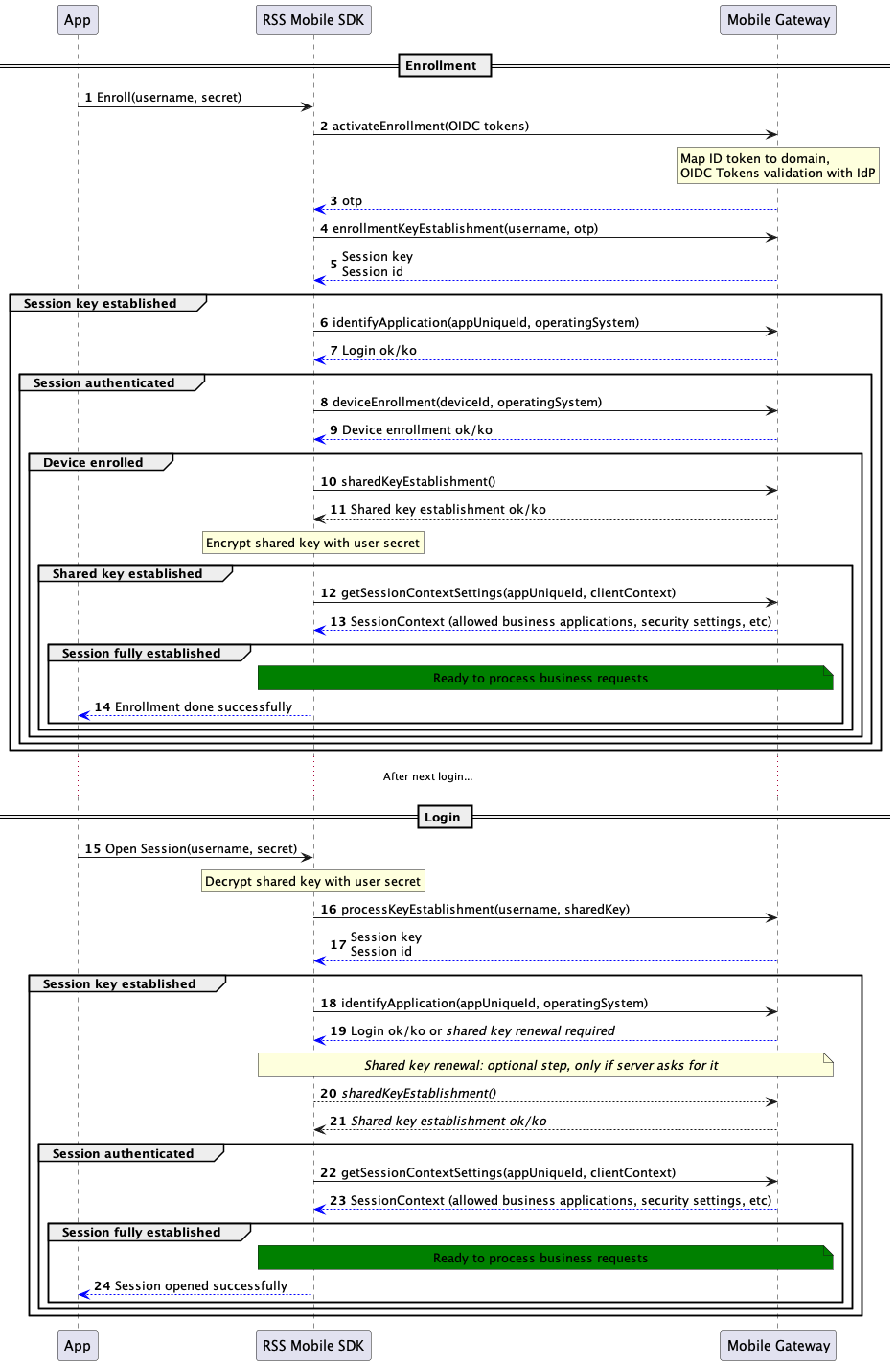
Mobile Gateway - Session establishment sequence diagram
The diagram below describes the session establishment between the SDK and the Mobile Gateway.
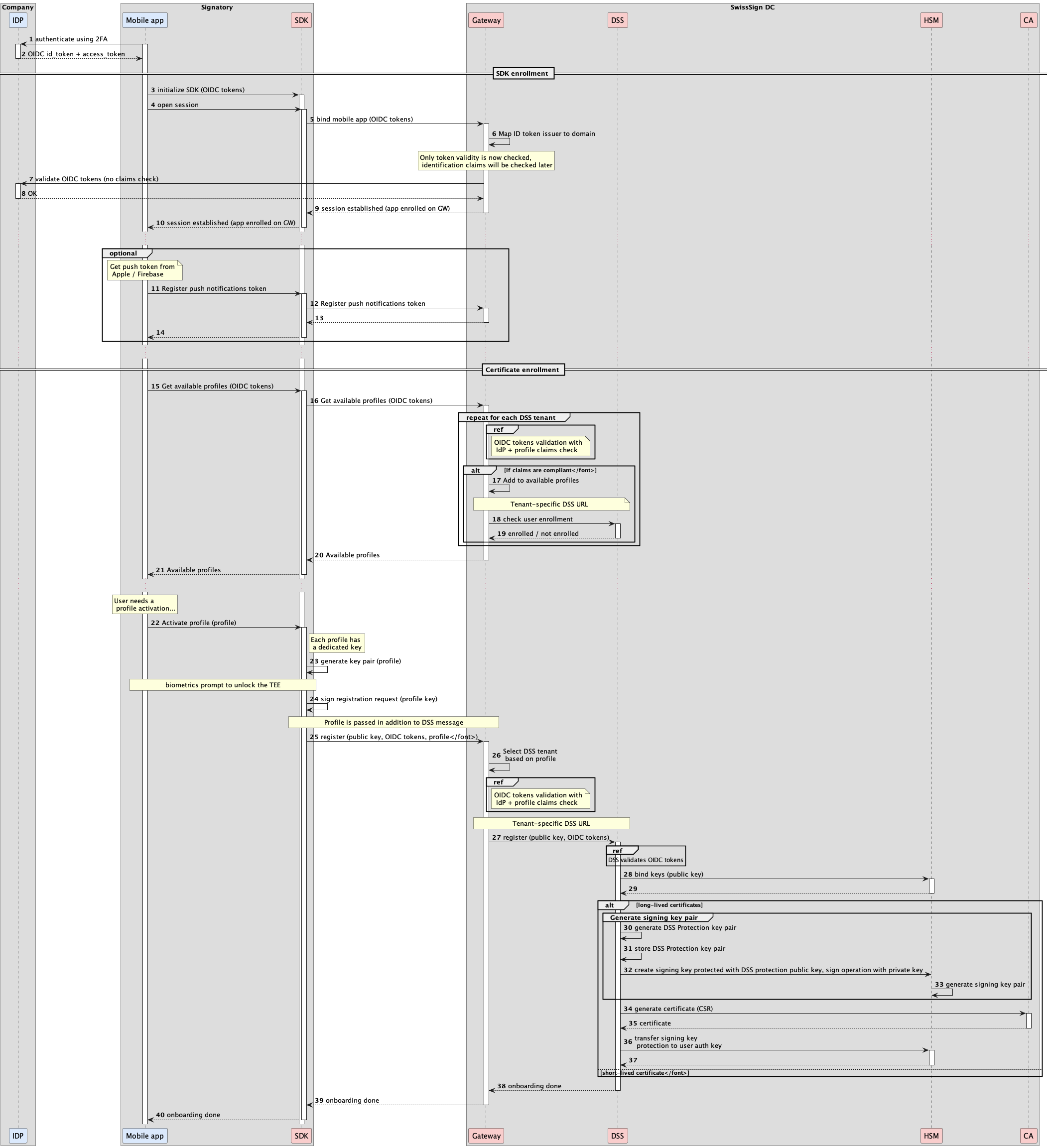
Registration sequence diagram
The diagram below describes the enrollment of the SDK and the registration of a DSS profile.
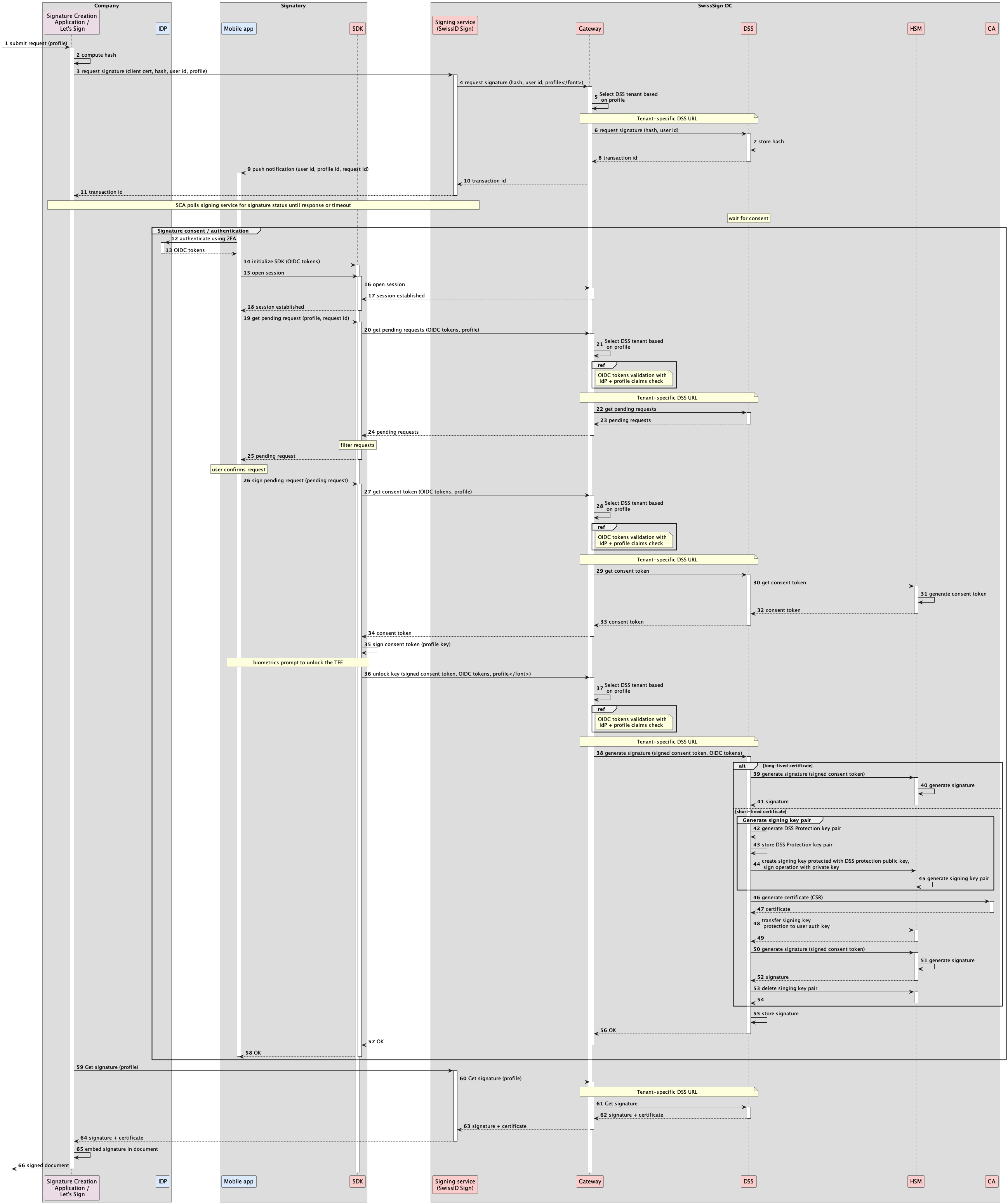
Signing sequence diagram
The diagram below describes the signing flow when the signing process is initiated from an external SCA and the SDK is used to authenticate the user and unlock the signature.
DSS Key management
Key specification
256 bits Elliptic Curve (NIST P-256 curve)
Key security
Android
The key is explicitly configured to require user authentication for every use.
This authorization applies only to private key operations. Public key operations are not restricted. It is requested using the system Biometric Prompt with a CryptoObject defining the cryptographic operation to be performed by the operating system.
The key is irreversibly invalidated by the operating system once the secure lock screen of the device is disabled, or when (reconfigured to None, Swipe or other mode which does not authenticate the user) or when the secure lock screen is forcibly reset (e.g., by a Device Administrator), see the KeyGenParameterSpec documentation.
The key is also irreversibly invalided by the operating system on biometric enrollment, or when no more biometrics are enrolled (e.g., when user has removed all registered fingerprints).
The key is explicitly configured to be valid for a duration.
iOS
In RSS iOS 2.6.0, DSS keys are created with kSecAccessControlBiometryCurrentSet | kSecAccessControlPrivateKeyUsage and kSecAttrAccessibleWhenPasscodeSetThisDeviceOnly.
Private-key operations require Face ID or Touch ID. The device passcode must be configured, but it is not a fallback authentication method for using the DSS private key. Retrieving the public key does not require biometric authentication.
The key is bound to the current biometric enrollment and to a device with a passcode. Changes to the biometric enrollment or removal of the passcode invalidate the key. See kSecAttrAccessibleWhenPasscodeSetThisDeviceOnly.
To support batch signing, the SDK calculates a bounded authentication reuse window (TTL) when generating the key, using signing-time measurements and the configured maximum duration. Within this window, it can reuse an authenticated LAContext for private-key operations; after expiry, biometric authentication is requested again. This is authentication-context reuse, not an extension of the key's lifetime.
If authentication or a key operation fails, the SDK reports the error to the application. The application must distinguish cancellation or temporary biometric unavailability from key invalidation, refresh the profile state, and drive reactivation when necessary. The SDK does not automatically present or complete the application's reactivation flow.
Key lifecycle
Generation of the key
A new key pair (private / public keys) is generated every time a new profile is activated.
The key pair is generated in the TEE with an alias corresponding to the dssProfileId prefixed by the username of the user and _ separator. For example, on iOS: UhOb5ZUX21c9KKifNImBvZj8Zd337miNAcyfi35xlwA=_PROFILE-X.
To sign multiple consent tokens, the SDK configures a bounded authentication window based on the estimated time needed for the maximum number of elements at maximum payload size, with a margin and an upper duration limit. On iOS, this controls reuse of the authentication context; it does not expire the key itself.
Android
Once the key is created, we ensure that the key is correctly configured and resides in a secure hardware (Trusted Execution Environment (TEE) or a Secure Element (SE)) using the following KeyInfo methods.
KeyInfo.isInsideSecureHardware(): The key resides in a a TEE or a SE
KeyInfo.isUserAuthenticationRequired(): The key requires a user authentication to be used
KeyInfo.isUserAuthenticationRequirementEnforcedBySecureHardware(): The key requires a user authentication for every cryptographic operation (e.g. no temporal validity interval authorizations)
These checks are required to ensure the device's vendor fulfils the security requirements set by the Android Open Source Project.
iOS
Storage in the TEE is enforced at the key creation specified by Apple's documentation.
Public key operations
The public key is retrieved for every requests with the DSS:
- Register end user
- Get pending requests
- Get consent token
- Sign consent token
The use of the public key does not require user authentication.
Private key operations
The cryptographic operations with the private key are needed to sign with ECDSA the following DSS requests:
- Register end user
- Sign consent token
These operations are performed directly by the TEE. The user has to authenticate to unlock the key. When initializing the cryptographic operation, an error might be raised if the key has been irreversibly invalided by the system.
Key invalidation
The key pair is invalidated in the following cases:
- The biometric enrollment changes on iOS, or a new biometric is enrolled on Android.
- The device passcode is removed (iOS).
- The device's security lock is reset or disabled, or the user has removed all registered biometrics (Android only).
- During log in, if the application is disenrolled by the security back-end
- The application is disenrolled by the app (through API)
Once the key pair is invalidated, cryptographic operations are not possible anymore and a new DSS registration is required.
SAP Confirmation code
The confirmation code for a given document signing request is part of the SAP (Signature Activation Protocol) when the document to be signed is displayed, and the DTBS (Data To Be Signed) is generated on a different SCA (Signature Creation Application) device than the SIC (Signer Interaction Component) device.
The confirmation code's purpose is to allow the signer to easily correlate a signature activation request displayed on both the SCA and the SIC.
Specifications
The confirmation code shall be displayed to the signer on the SCA after submitting the DTBSR (Data To Be Signed Representation) to the SSA.
The confirmation code shall not be transmitted between the SCA and the SIC, only a "wake up" mobile push notification containing no transaction-related data should be sent to the SIC in order to initiate the SAP.
The SIC shall fetch the pending signature activation request from the SSA, and display the same confirmation code to the signer.
The confirmation code is derived from the responseID (defined in ETSI TS 119 432, chapter 7.26) on both the SCA and the SIC.
Derivation algorithm
The responseID is generated randomly by the DSS when submitting the DTBS from the SCA. The confirmation code is based on a decimal value derived from this responseID through the following algorithm:
- Hash the
responseIDstring's UTF-8 encoded value through SHA-256 - Take the first 4 bytes and cast it as an unsigned integer
- Use the resulting value modulo 100'000'000
The confirmation code is displayed in two groups of 4 digits, padded with zeros if needed, eg: 1234-5678
Inventory of cryptographic keys
The table below lists all cryptographic keys used by the SDK and its services. The list does not contain keys used exclusively by server modules.
| Building block | Component | Description | Key details | Generation details | Purpose | Lifecycle | Storage |
|---|---|---|---|---|---|---|---|
| RSS Mobile SDK | Session Service (Mobile Gateway binding & communication) | DH key | 2048 bits Diffie-Hellman | Key exchange using Diffie-Hellman, authenticated with shared secret key or activation key. Generated when opening a session on the GW | Temporary shared key for session key + shared secret key derivation. On top of https. | Lifetime: session | In-memory |
| RSS Mobile SDK | Session Service (Mobile Gateway binding & communication) | Shared secret key | 256 bits authentication key, encrypted with a user-supplied password / PIN code | Derived from DH key when renewed. On mobile encrypted with user secret, on database not encrypted by the application | SHA-256 HMAC authentication of DH key exchange. The key is encrypted when stored using AES 256 with a key derived from a user-supplied password / PIN code | Renewed based on GW configuration. Lifetime: configurable (security server’s admin console). Min value: 1hour in GUI, but can be set to lower value in the database | iOS: Keychain, Android: KeyStore, GW: database |
| RSS Mobile SDK | Session Service (Mobile Gateway binding & communication) | Activation key | 256 bits authentication key | Short-lived one time use activation code with expiration timestamp, used when activating the SDK. Derived from from randomly generated 16 alphanumeric characters activation code | Initial Shared secret key on SDK activation / GW binding | Lifetime: configurable (security server’s admin console). Min value: 1hour in GUI, but can be set to lower value in the database. Deleted once consumed (normally a few milliseconds after having been generated) | iOS & Android: In-memory, GW: database |
| RSS Mobile SDK | Session Service (Mobile Gateway binding & communication) | Session key | 256 bits AES/GCM encryption key | Derived from DH key when opening a session. Temporary | Data encryption for communication between SDK and gateway (in addition to TLS) | Lifecycle bound to session’s lifecycle | In-memory |
| RSS Mobile SDK | Smart Contract service | Smart Contract messages signing key | RSA 2048 bits | Generated when activating the SDK through a CSR (Session Service). Generated using mobile devices standard crypto APIs and storage | Signature of Smart Contract messages sent to the workflow engine | Generated when activating the SDK through a CSR | iOS: Keychain, Android: KeyStore |
| RSS Mobile SDK | DSS Service (SIC) | DSS Auth Key for Signature Activation/Consent | 256 bits Elliptic Curve (NIST P-256 curve) OID 1.2.840.10045.3.1.7. Payload signed using ECDSA with SHA-256 OID 1.2.840.10045.4.3.2 | Generated when activating the SDK. Generated on mobile protected hardware (TEE), unlocked using biometric authentication (iOS batch signing can reuse an authenticated context within its bounded TTL). To unlock the signing key on the HSM | Signature of messages to the DSS for user registration (with EC public key) and consent token, using ECDSA | Lifetime: bound to DSS’ qualified certificate’s lifetime or mobile app installation or user’s signature service registration | Hardware protected security module (TEE) |
iOS Error Codes
The table below list all available errors that may be raised by the iOS native SDK with Domain ch.sysmosoft.sense.framework.ErrorDomain. The integer error code can be used to identify specifically the type of the error.
| Error code | Error description |
|---|---|
| 100 | Account locked |
| 101 | Device locked |
| 102 | User disenrolled |
| 104 | Authentication failed |
| 105 | Device not compliant |
| 109 | Network error |
| 110 | User already enrolled |
| 114 | Authentication max tries |
| 115 | User not enrolled |
| 120 | Not allowed to register notification token |
| 200 | Request canceled |
| 400 | Unknown response |
| 401 | Identification error |
| 403 | Account locked |
| 404 | Access Denied |
| 405 | Application disabled |
| 407 | Session error |
| 408 | Request timeout |
| 500 | Server unreachable |
| 501 | Missing proxy URL |
| 502 | Server Error |
| 302 | No session |
| 303 | Invalid signature |
| 304 | Key not found |
| 305 | Key already exists |
| 306 | Failed to access to the secure enclave |
| 307 | Unexpected error |
DSS Error mapping
The table below list all available errors that may be raised by the DSS server component. The integer error code can be used to identify specifically the type of the error.
Client error codes
List of error codes that are likely to happen in case of registration synchronisation or signing timeout issues.
Most of code 32 errors (eg. when the application was reinstalled) can be prevented by checking the profile registration status before attempting to register or use a profile.
Some code 39 errors can still happen when a profile was unregistered from the backend or registered from a different device when the registration status was not yet refreshed. In that case, users should be prompted to delete and re-activate the profile.
Code 58 errors may happen in case the of a retry of a signing authentication that succeeded (users must be prevented from submitting the same request twice). Code 59 errors can happen when users take too much time for the biometric authentication. Usually, the user has 90 seconds to authenticate. In both cases, the application should synchronise with server and reload the pending request(s) and/or check for contract status.
Code 60 errors happen when the validation of integrity token against google playintegrity fails.
DSS component version: 3.0.0
| Error code | Error message |
|---|---|
| 32 | User already registered with a different authentication key. |
| 39 | User not registered. |
| 58 | This digest has already been signed. |
| 59 | The related signing request has expired. |
| 60 | Playintegrity validation failed. |
Other error codes
With the exception of the client error codes from the previous section, other error codes are likely to be due to a configuration issue or temporary malfunction due to the failure of a backend component.
In that case, users should be prompted to retry a later, with the DSS error code printed in case the error persists and they need to contact the support.
DSS component version: 3.0.0
| Error code | Error message |
|---|---|
| 1 | Unknown entity 'MyClass' with UUID '4cfcf5c4-ecb6-493a-9973-4823116aebbd'. |
| 2 | Remote certificate authentication configured via HTTP header. No certificate found for header attribute 'X-SSL-CERT'. |
| 3 | Error while decoding certificate. |
| 4 | No signatory certificate found in certificate list. |
| 5 | PKCS#10 request does not validate its digital signature. |
| 6 | Certificate digital signature does not validate. |
| 7 | No issuer certificate located in chain. |
| 8 | Certificate with SDN 'CN=John Doe' and S/N '123456789' expired on '20.12.2012'. |
| 9 | Certificate with SDN ' CN=John Doe ' and S/N '123456789' revoked on '20.12.2012'. |
| 10 | OSP URL 'https://ocsp.ch' replied with invalid status '42'. |
| 11 | OSP URL ' https://ocsp.ch' error. |
| 12 | OSP URL ' https://ocsp.ch' HTTP status code error '42'. |
| 13 | CRL URL ' https://ocsp.ch' not located. |
| 14 | CRL encoding error. |
| 15 | Certificate SDN ' CN=John Doe' not authorized for customer '5bdeee56-dc9f-4f22-ac1e-fd30a50e735f'. |
| 16 | Error reading signedPayload from HTTP request. |
| 17 | Error parsing ASN.1 signedPayload. |
| 18 | Invalid ANS.1 signedPayload. |
| 19 | No algorithm name resolver for 'MySigningAlgorithm'. |
| 20 | No Key Factory located. |
| 21 | Signature does not match. |
| 22 | Signing certificate not found. |
| 23 | Too many signing certificates. |
| 24 | Failed to extract ToBeSigned. |
| 25 | Baseline not supported '42'. |
| 26 | Signature format not supported '42'. |
| 27 | Hexadecimal coder error. |
| 28 | Unknown algorithm id. |
| 29 | Cannot log on HSM partition 'DSS-part1'. |
| 30 | Failed to fetch key 'DSS-part1:key-12345'. |
| 31 | Failed to initialize key store. |
| 32 | User already registered with a different authentication key. |
| 33 | No JWT token. |
| 34 | JWT token validation failed. |
| 35 | JWT token is invalid. |
| 36 | Failed to generate key. |
| 37 | Failed to encode public key. |
| 38 | Failed to sign document. |
| 39 | User not registered. |
| 40 | Failed to generate CSR. |
| 41 | Private Key not found in store. |
| 42 | Failed to fetch key from store. |
| 43 | Failed to fetch certificate from store. |
| 44 | Error opening key store. |
| 45 | Error sending CMC request. |
| 46 | Error in CMC reply with status code: 42. |
| 47 | Certificate chain error. |
| 48 | Could not find signing certificate for user. |
| 49 | The URL to retrieve JSON Web Key information is invalid. |
| 50 | DSS has no configured TSA source. |
| 51 | Customer has no HSM configuration. |
| 52 | Key is not hardware. |
| 53 | Maximum number of requests for this transaction reached. |
| 54 | Cannot find DSS configuration for id 'c3c77821-5033-4486-a741-58484f5df3c2' or default config. |
| 55 | Error cannot upload twice same transaction (client id '1c37ffc9-b8da-40a1-b1a5-b80cf47daa42'). |
| 56 | numSignatures of the request does not match numSignatures of the transaction. |
| 57 | Could not find signing transaction with id '6463b5b9-9fce-4459-bc17-52884bbba7a3'. |
| 58 | This digest has already been signed. |
| 59 | The related signing request has expired. |
| 60 | Could not find digest with id '721cfdfc-1c1e-4b31-83cc-20e532186a5d'. |
| 61 | Failed to generate QR code. |
| 62 | Unknown customer. |
| 63 | This customer does not use key protection. |
| 64 | Template processing error. |
| 65 | Customer already has ska config. |
| 66 | Customer not properly initialized. |
| 67 | Interrupted execution. |
| 68 | Operation refused. Customer has signatories. |
| 69 | User not authorized. |
| 70 | Invalid user role. |
| 71 | Audit log is not empty. |
| 72 | Failed to sign audit log. |
| 73 | No more digest to sign for transaction 'adfa80cf-b8a7-4175-a8c0-e58fb9cd57cc'. |
| 74 | Access Token Response is not valid. |
| 75 | Signatory '568d1cfb-6c62-4dfd-85a5-ca8b3b76f10c' credential not valid. |
| 76 | First audit log entry 'c3822b1b-74ba-4587-a4e9-9e15f34ac681' is not valid. |
| 77 | Last audit log entry 'e1cf61eb-c074-488a-aa73-d3efaabf5bf5' is not valid. |
| 78 | Audit log entry '9794112c-e5b8-4508-8b35-31bf3ec54566' has an invalid signature. |
| 79 | Certificate with SDN 'CN=John Doe' and S/N '6463b5b9' is unknown to the OCSP. |
| 80 | Audit key '4d9001a9-bef0-4bea-a163-d0d290f52581' is not retired, cannot delete. |
| 81 | HSM key '4d9001a9-bef0-4bea-a163-d0d290f52581' is not retired, cannot delete. |
| 82 | Invalid TSA URL. |
| 83 | Failed to generate a valid timestamp. |
| 84 | This method is not implemented yet. |
| 85 | Key encoding error. |
| 86 | Failed to delete key '4bd3dcd5-1249-4f7f-865d-2924d5d80a9c' from HSM. |
| 87 | Failed to revoke certificate '123456789'. |
| 88 | Failed to generate CSR, OID '2.5.4.4' has no suitable mapping. |
| 89 | Failed to normalize URL with prefix 'foobar' |
| 90 | Error during UserInfo request: 'Code 00 Description foobar' |
| 91 | Error during request cancellation: 'adfa80cf-b8a7-4175-a8c0-e58fb9cd57cc' |
| 92 | Retired PublicKey. |
| 93 | Error reading oidc mapping: 'foobar' |
| 94 | Signing transaction with id 'adfa80cf-b8a7-4175-a8c0-e58fb9cd57cc' is partially signed. |
| 95 | Signing transaction with id 'adfa80cf-b8a7-4175-a8c0-e58fb9cd57cc' is expired. |
| 96 | Signing transaction with id 'adfa80cf-b8a7-4175-a8c0-e58fb9cd57cc' is incomplete. |
| 97 | Signing key not found. |
| 98 | Invalid payload content. |
| 99 | Failed to create SignatureToken. |