
From 2026.0.x to 2026.1.x
Migrations
1. Metadata renaming
If moving from 2026.0.x < 2026.0.4: Fixing LS-3334
The organizationId metadata for all lets-sign.workflow.available-workflows using letssign-rss as remoteSigningService (For example, letssign-rss-scs-swisssign-qes in LS Nightly) must be renamed to remoteOrganizationId. Example:
letssign-rss-scs-swisssign-qes:
  name: SwissSign QES PDF
  type: PDF
  workflow-id: rss
  web-client-supported: true
  envelope-supported: true
  signature-level: QES
  regulation: ZERTES
  meta-data:
    remoteSigningService: letssign-rss
    remoteOrganizationId: 173419d6-fb74-4752-95bf-b7eaf8639ce2
    signingServiceProfile: scs-swisssign-qes-zertes
    swissid:
      required-qor: QOR2
      step-up-required: false
      step-up-purpose: ZERTES
      step-up-web-flow: true
2. Configuration of authentication providers per workflow (and signing without authentication)
You must apply the configuration changes below to ensure document signing remains protected.
Until now, document signing access was based on the lets-sign.security.signing-invitation-protection property in the Let's Sign configuration. Possible values were:
NONE: no authentication required; anyone with the link can open the documentREQUIRES_AUTHENTICATION: user is redirected to web client only if he is correctly authenticated on Let’s Sign console (internal or OIDC)FORWARD_TO_INBOX: user is always redirected to his inbox which requires also the Let’s Sign authentication
With this new feature, the protection is now configured at the workflow level. By default, the new property is assigned to no specific authentication, which means that Let's Sign delegates the responsibility to protect document access to the web client.
This change could require a workflow configuration update, depending on the value previously set for the signing-invitation-protection property.
1. The value of signing-invitation-protection was NONE
Security is managed by the web client regarding the default authentication provider:
- A) If no
default-authentication-provideris configured on the web client, the document access will not be protected. - B) If
default-authentication-provideris configured, the user will be redirected to the configured OIDC provider login page before opening the document.
Example:
application-websign.ymlwebsign:
security:
default-authentication-provider: swissid2. The value of signing-invitation-protection was REQUIRES_AUTHENTICATION
You must protect the document access using one of the following methods:
- A) Don't change the workflow configuration and ensure that a default authentication provider is well configured on the web client, as described in point 1.B.
- B) Else, configure the authentication provider for each workflow. In that case, the web client default authentication will be overpassed by the one you have chosen.
=> You must access the admin console and configure the desired authentication provider on each workflow (this must be done for each organization).
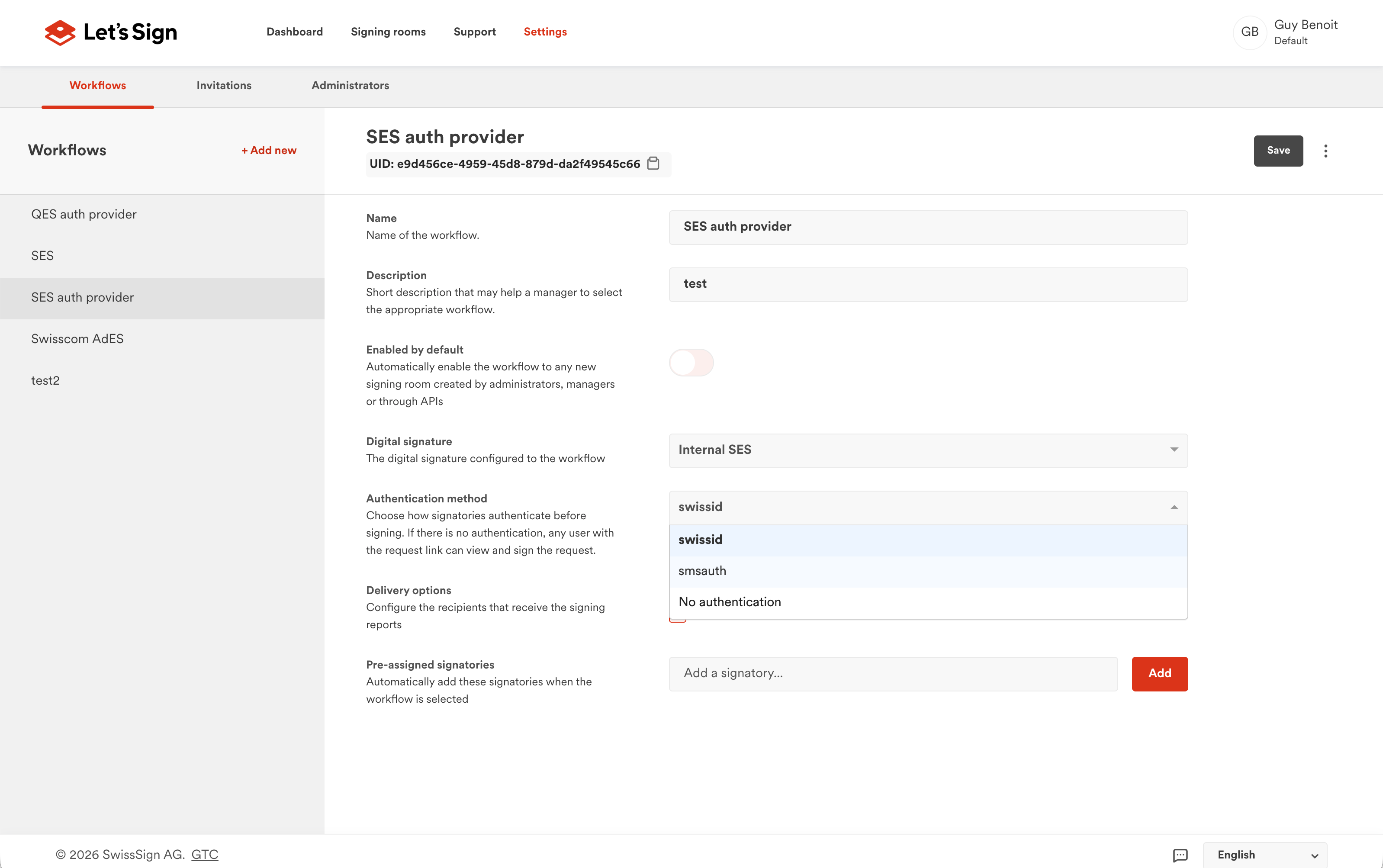
If you want to configure the same authentication provider for all workflows within a specific organization, you can run the following script.
PostgreSQL:
UPDATE workflow w
SET authentication_provider = 'your_auth_provider'
FROM organization org
WHERE w.organization_id = org.id
  AND org.identifier = 'your_org_identifier';
SQL Server:
UPDATE w
SET w.authentication_provider = 'your_auth_provider'
FROM workflow AS w
INNER JOIN organization AS org
  ON w.organization_id = org.id
WHERE org.identifier = 'your_org_identifier';
Alternatively, to apply the same authentication provider to all workflows across all organizations:
PostgreSQL & SQL Server:
UPDATE workflow
SET authentication_provider = 'your_auth_provider';
3. The value of signing-invitation-protection was FORWARD_TO_INBOX
You must add the new forward-to-inbox property and set it to true:
lets-sign:
  security:
    forward-to-inbox: true
Once authenticated in Let's Sign, the signer will be redirected to their inbox before signing.
=> If you want to keep the use of internal authentication, you can use this configuration.
=> If this forward-to-inbox property is set in addition to an authentication provider configured on the workflow and/or the web client default authentication, the user will have to authenticate twice: first in Let's Sign (OIDC or internal) and second in the web client (OIDC).
Once the above changes are completed, remove the lets.sign.security.signing-invitation-protection property from the application-letssign.yml file, as it is now obsolete.