
Introduction
Overview
The WYSIWYS SDK consists of a mobile SDK for both Android and iOS. It provides a simple and secured PDF View that can be embedded into any existing application.
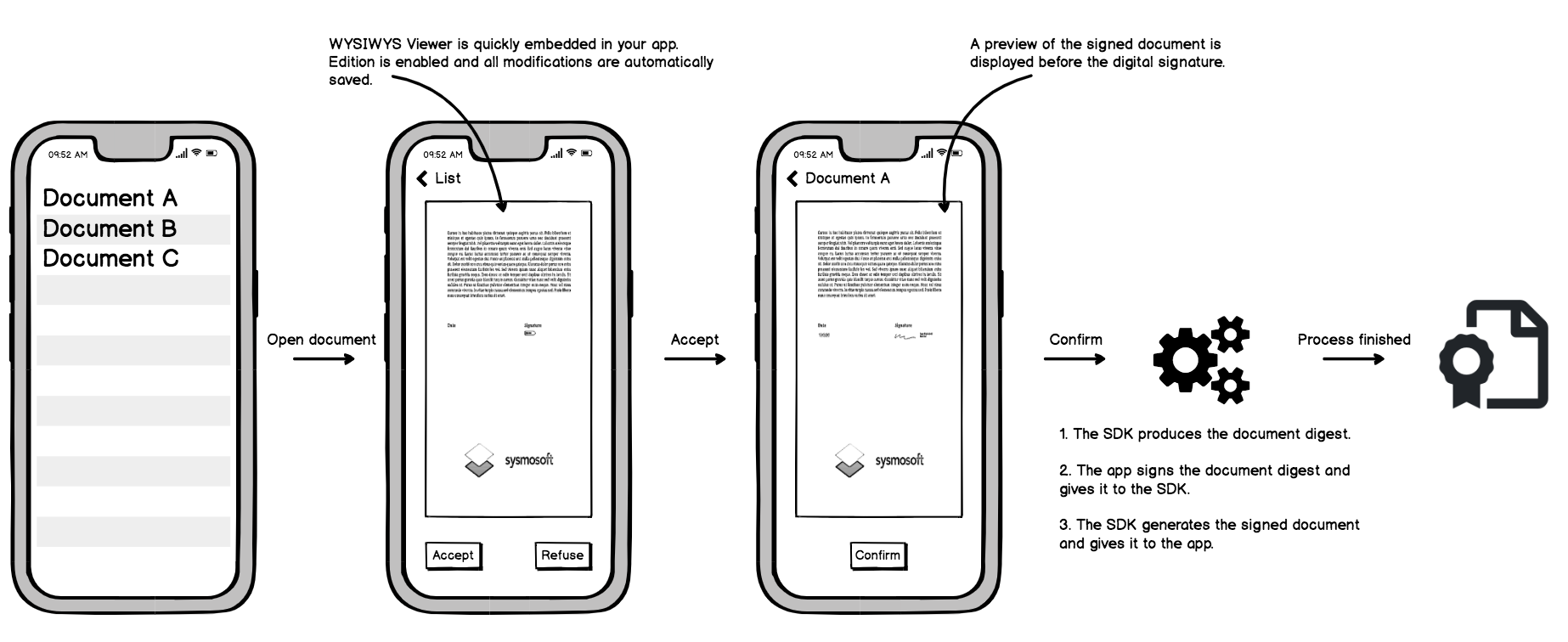
Several features are available out of the box :
- Document is rendered in a secure viewer
- Fluid PDF Viewing with horizontal or vertical scroll navigation
- Scroll navigation can be set to page per page or continous
- Thumbnail view
- Zoom
- PDF 1.0 - 1.7 + ISO PDF (32000) support
- Modifications are securely stored until the document is signed.
- PDF forms are supported :
- Required forms are verified prior the signature
- Handle documents with zero, one or more signature fields
- Possibility to sign with invisible signature
- Text signature can be generated automatically based on the signer's name.
- Visual signatures can be drawn or uploaded by the user and are securely stored on the device.
- Visual signature can be positioned by the user or automatically inserted in existing signature field.
- Preparation of the file for signature with document digest calculation.
- Integration of the signature in the document
Integrating the SDK will only require the following implementation steps :
- Insert the view in an existing layout
- Manage interaction with the viewer (buttons, labels, etc)
- Generate a signature from the document digest locally or through a remote signature service.
- Define external visual signature provider to give your own implementation of signature storage.
The WYSIWYS SDK offers also several APIs that can be used without PDF rendering for background processing.
Sequence diagram
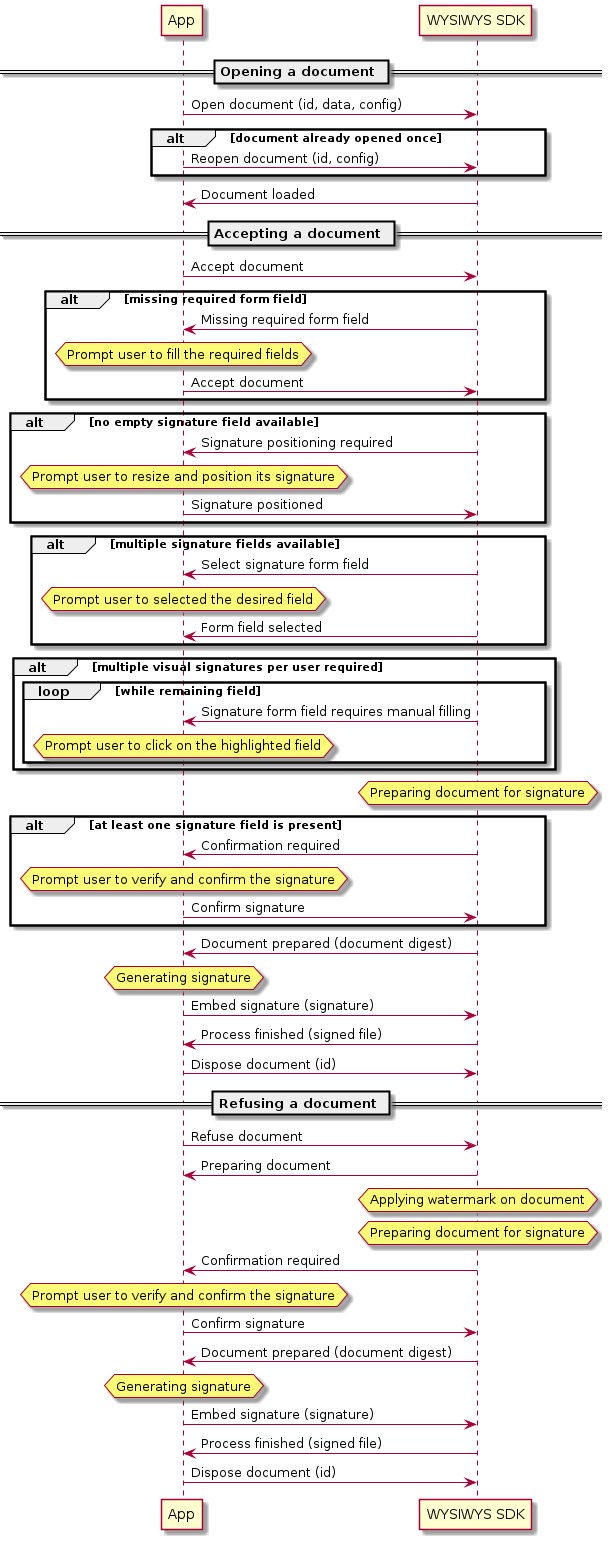
The diagram below shows the different sequences that can happen when signing a document. The app should handle all of them to ensure that all kinds of document can be signed.
The sequences are identical for both platforms, but the method names and arguments may slightly differ depending the platform.
Preparing PDF Form for the WYSIWYS SDK
The WYSIWYS SDK supports a wide range of PDF, including PDF Forms.
If the PDF document does not have any signature field, the user will be prompted to place its visual signature at the desired page and area.
The SDK offers also the possibility to improve the signing perience by adding signature form fields to the document.
Let the user choose one of several signature field
To let the user choose a signature field among several available, simply prepare a document with multiple signature fields. The signature fields are highlighted when user needs to select the desired field.
Force signature position for a user
To prevent user choosing the position of its signature, it's possible to prepare the PDF with a single signature form.
In case the PDF requires multiple digital signatures, it's possible to prepare the PDF by setting specific name attribute for the signature fields :
- If the
nameattribute match the username sets during SDK initialization, it will be selected automatically - If the
nameattribute match the patternsmartcontract_sign_field_{index}where{index}is a number corresponding to the signer index, the signature field is automatically selected in the order defined.
Multiple visual signatures per user
The SDK provides a dedicated mode for electronic signature. In this mode, the user will be able to apply its visual signatures in different places of the same document. The PDF is then flattened and digitally signed with an invisible signature. Please note that signing this kind of documents will always remove previous digital signature before applying the new one (due to flattening process), meaning that for a PDF requiring multiple signatures, the final document will only have a single invisible signature (usually an electronic seal).
This mode of signature is automatically enabled if the signature fields present in the PDF match the following patterns :
- If multiple fields have the
nameproperty that match the patternsmartcontract_sign_field_{signatoryIndex}_{fieldIndex}, wheresignatoryIndexis a number corresponding to the signer index and{fieldIndex}a number corresponding to the field index. - If multiple fields have the
nameproperty that match the patternsmartcontract_sign_field_{username}_{fieldIndex}, whereusernamematch the username set during SDK initialization and{fieldIndex}a number corresponding to the field index.